

Edge Detection & Gradients
Edges are where the action is. They mark boundaries between objects, transitions between colors, and outlines of shapes. Finding edges is often the last preprocessing step before “real” computer vision — contour detection, feature matching, and object recognition all start with edges.
What is an Edge?
Section titled “What is an Edge?”An edge is a sharp change in pixel intensity. Mathematically, it’s where the gradient (first derivative) of the image is large.
Pixel row: [10, 10, 10, 200, 200, 200] ↑ EDGE HERE (intensity jumps from 10 to 200)The gradient at each pixel tells you two things:
- Magnitude: How strong the edge is (big jump = strong edge)
- Direction: Which way the intensity changes (horizontal, vertical, diagonal)
Where is the gradient in the horizontal direction and is the vertical gradient.
Sobel Operator
Section titled “Sobel Operator”The Sobel operator computes gradients by convolving the image with two 3×3 kernels — one for horizontal changes () and one for vertical changes ():
Sobel X (vertical edges): Sobel Y (horizontal edges): ┌─────────────┐ ┌────────────┐ │ -1 0 +1 │ │ -1 -2 -1 │ │ -2 0 +2 │ │ 0 0 0 │ │ -1 0 +1 │ │ +1 +2 +1 │ └─────────────┘ └────────────┘import cv2import numpy as np
img = cv2.imread("photo.jpg", cv2.IMREAD_GRAYSCALE)
# Always blur first to reduce noiseblurred = cv2.GaussianBlur(img, (5, 5), 0)
# Compute gradients in X and Y directions# Use CV_64F to capture negative gradients (dark-to-light transitions)sobel_x = cv2.Sobel(blurred, cv2.CV_64F, 1, 0, ksize=3)sobel_y = cv2.Sobel(blurred, cv2.CV_64F, 0, 1, ksize=3)
# Convert back to uint8 (take absolute value first)abs_x = cv2.convertScaleAbs(sobel_x)abs_y = cv2.convertScaleAbs(sobel_y)
# Combine X and Y gradientscombined = cv2.addWeighted(abs_x, 0.5, abs_y, 0.5, 0)Scharr Operator
Section titled “Scharr Operator”For 3×3 kernels, the Scharr operator is more accurate than Sobel. It uses different kernel values that better approximate the true gradient:
# Scharr in X direction (more accurate than Sobel for 3x3)scharr_x = cv2.Scharr(blurred, cv2.CV_64F, 1, 0)scharr_x = cv2.convertScaleAbs(scharr_x)Use Scharr when you’re using a 3×3 kernel and need maximum accuracy. For larger kernels (5×5, 7×7), Sobel is the better choice.
Laplacian
Section titled “Laplacian”The Laplacian computes the second derivative of the image, detecting edges in all directions simultaneously. Unlike Sobel (which gives you separate X and Y), Laplacian outputs a single edge map.
laplacian = cv2.Laplacian(blurred, cv2.CV_64F)laplacian = cv2.convertScaleAbs(laplacian)The trade-off: Laplacian is more sensitive to noise than Sobel because second derivatives amplify high-frequency noise. Always blur before using it.
Canny Edge Detection
Section titled “Canny Edge Detection”Canny is the gold standard of edge detection. Developed by John Canny in 1986, it’s a multi-stage algorithm that produces clean, thin, well-connected edges. Most edge detection tasks should start here.
-
Gaussian Blur: Smooths noise (Canny does this internally, but pre-blurring often helps).
-
Gradient Computation: Calculates intensity gradients using Sobel (internally).
-
Non-Maximum Suppression: Thins the edges to 1-pixel width by keeping only the local maxima in the gradient direction.
-
Hysteresis Thresholding: Uses two thresholds to classify edge pixels:
- Gradient >
threshold2(high) → Strong edge (definitely an edge) - Gradient <
threshold1(low) → Not an edge (discard) - In between → Weak edge (kept only if connected to a strong edge)
- Gradient >
# threshold1 = low threshold, threshold2 = high thresholdedges = cv2.Canny(blurred, threshold1=50, threshold2=150)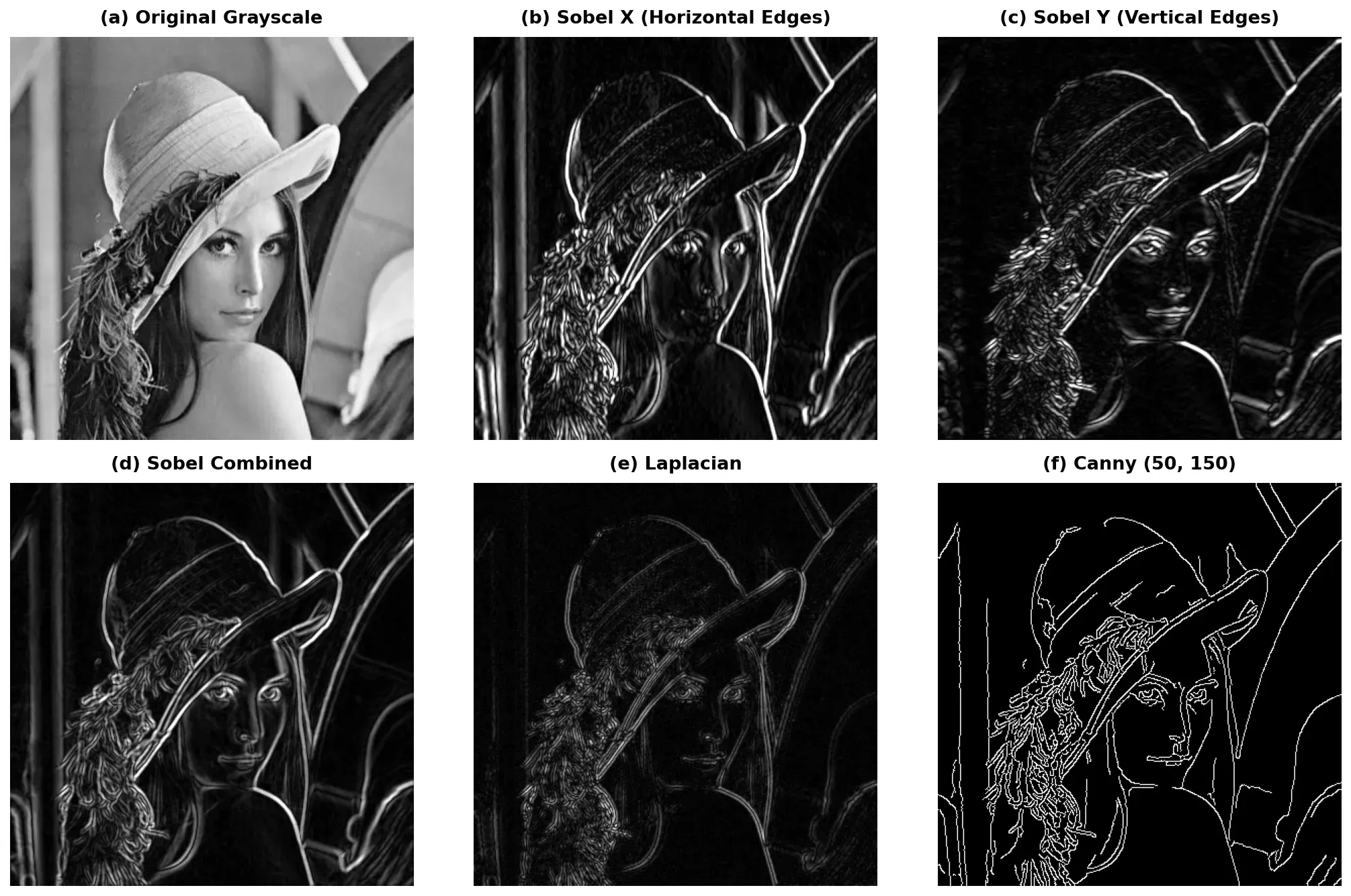
Choosing Canny Thresholds
Section titled “Choosing Canny Thresholds”The two thresholds control how sensitive Canny is:
- Low threshold1, low threshold2: Detects more edges (including noise)
- High threshold1, high threshold2: Detects only strong, obvious edges
- Common ratio:
threshold1 = 0.5 * threshold2works well as a starting point
Choosing the Right Detector
Section titled “Choosing the Right Detector”| Detector | Strengths | Weaknesses | Best For |
|---|---|---|---|
| Sobel | Fast, directional (X/Y separately) | Thick edges, needs combining | When you need gradient direction info |
| Scharr | More accurate than Sobel (3×3 only) | Same thickness issue as Sobel | Precision gradient calculation |
| Laplacian | Omnidirectional, single output | Very noise-sensitive | Quick edge overview, Blob detection |
| Canny | Clean, thin, connected edges | Two thresholds to tune | General-purpose edge detection |
Practical Example: Full Edge Detection Pipeline
Section titled “Practical Example: Full Edge Detection Pipeline”import cv2import numpy as np
# 1. Load the imageimg = cv2.imread("photo.jpg")if img is None: raise FileNotFoundError("Could not load image!")
# 2. Convert to grayscalegray = cv2.cvtColor(img, cv2.COLOR_BGR2GRAY)
# 3. Blur to reduce noiseblurred = cv2.GaussianBlur(gray, (5, 5), 0)
# 4. Apply Canny edge detection# Use the median heuristic for automatic threshold selectionmedian = np.median(blurred)lower = int(max(0, 0.7 * median))upper = int(min(255, 1.3 * median))edges = cv2.Canny(blurred, lower, upper)
# 5. Display resultscv2.imshow("Original", img)cv2.imshow("Edges (Canny)", edges)cv2.waitKey(0)cv2.destroyAllWindows()Summary Checklist
Section titled “Summary Checklist”- Image gradients: Rate of change in pixel intensity. Magnitude tells edge strength, direction tells edge orientation.
- cv2.Sobel(): Use
cv2.CV_64Ffor ddepth, thencv2.convertScaleAbs(). Combine X and Y withcv2.addWeighted(). - cv2.Scharr(): More accurate than Sobel for 3×3 kernels. Same usage pattern.
- cv2.Laplacian(): Second derivative, omnidirectional. More noise-sensitive — always blur first.
- cv2.Canny(): The gold standard. Two thresholds control sensitivity. A good starting ratio is
low = 0.5 * high. - Always blur first: Noise creates false edges.
GaussianBlur(img, (5,5), 0)before any edge detector.