

Build on Jetson Nano
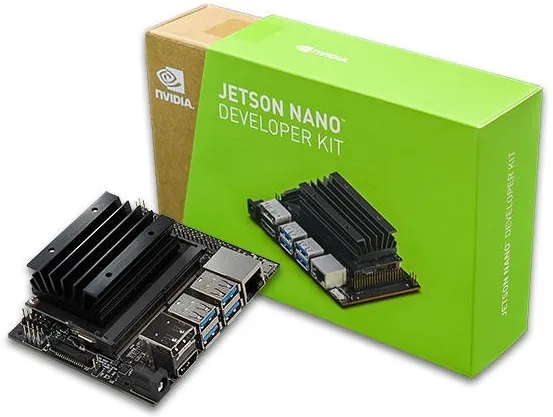
Hardware Reference
Section titled “Hardware Reference”The Jetson Nano Developer Kit specs relevant to this build:
| Spec | Value |
|---|---|
| SoC | NVIDIA Tegra X1 (tegra210) |
| GPU | Maxwell architecture, 128 CUDA cores |
| CUDA compute capability | 5.3 |
| RAM | 4 GB LPDDR4 (shared between CPU and GPU) |
| Last supported JetPack | 4.6.x |
JetPack 4.6.x software stack:
| Component | Version |
|---|---|
| OS | Ubuntu 18.04 (L4T 32.7.x) |
| CUDA | 10.2 |
| cuDNN | 8.2 |
| TensorRT | 8.2 |
| Pre-installed OpenCV | 4.1.1 — without CUDA support |
Jetson Device Comparison
Section titled “Jetson Device Comparison”| Device | Architecture | CUDA_ARCH_BIN | JetPack |
|---|---|---|---|
| Jetson Nano (original) | Maxwell | 5.3 | 4.6.x (Ubuntu 18.04) |
| Jetson TX2 | Pascal | 6.2 | 4.6.x |
| Jetson Xavier NX | Volta | 7.2 | 4.6.x / 5.x |
| Jetson AGX Xavier | Volta | 7.2 | 4.6.x / 5.x |
| Jetson Orin Nano | Ampere | 8.7 | 6.x (Ubuntu 22.04) |
| Jetson Orin NX | Ampere | 8.7 | 6.x (Ubuntu 22.04) |
| Jetson AGX Orin | Ampere | 8.7 | 6.x (Ubuntu 22.04) |
Step-by-Step Build
Section titled “Step-by-Step Build”-
Enlarge swap memory.
The Jetson Nano has 4 GB RAM shared between CPU and GPU. Building OpenCV 4.6+ requires at least 8.5 GB total memory (RAM + swap) for a parallel 4-core build. With only the default 2 GB zram swap, the build will either fail with OOM errors or fall back to single-core compilation.
Terminal window # Check current memory — you need RAM + Swap > 8500 MB for a fast 4-core buildfree -m# Disable existing zram swapsudo swapoff -a# Create a 6 GB swap file on the microSD card (or USB drive — faster)sudo fallocate -l 6G /var/swapfilesudo chmod 600 /var/swapfilesudo mkswap /var/swapfilesudo swapon /var/swapfile# Make permanent (add to fstab)echo '/var/swapfile swap swap defaults 0 0' | sudo tee -a /etc/fstab# Verifyfree -m -
Set Jetson to maximum performance mode.
Terminal window sudo jetson_clocks # lock clocks at maxsudo nvpmodel -m 0 # MAXN mode (all 4 CPU cores, full GPU) -
Remove the pre-installed OpenCV to avoid import conflicts.
Terminal window sudo apt-get purge libopencv-dev libopencv python3-opencvsudo apt-get autoremovesudo apt-get update -
Verify CUDA environment variables are set.
CUDA should already be in PATH from JetPack, but confirm:
Terminal window nvcc --version # should show CUDA 10.2python3 -c "import ctypes; ctypes.cdll.LoadLibrary('libcuda.so.1')" -
Install build dependencies.
Terminal window sudo apt-get update && sudo apt-get upgrade -ysudo apt-get install -y \build-essential cmake git pkg-config \libavcodec-dev libavformat-dev libswscale-dev \libgstreamer1.0-dev libgstreamer-plugins-base1.0-dev \libxvidcore-dev libx264-dev \libgtk-3-dev libcanberra-gtk3-module libcanberra-gtk-module \libjpeg-dev libpng-dev libtiff-dev \libtbb2 libtbb-dev \libdc1394-22-dev \libv4l-dev v4l-utils \libhdf5-dev libhdf5-serial-dev \libopenblas-dev liblapack-dev libblas-dev gfortran \python3-dev python3-numpy python3-pip \libopenjp2-7-dev# cuDNN dev headers (already installed by JetPack 4.6)sudo apt-get install -y libcudnn8-dev -
Clone repositories — pin all three to the same version tag.
Terminal window OPENCV_VERSION="4.10.0"cd ~git clone --branch ${OPENCV_VERSION} https://github.com/opencv/opencv.gitgit clone --branch ${OPENCV_VERSION} https://github.com/opencv/opencv_contrib.gitgit clone https://github.com/opencv/opencv_extra.gitcd opencv_extra && git checkout ${OPENCV_VERSION} && cd ..mkdir ~/opencv/build && cd ~/opencv/build -
Configure with CMake (JetPack 4.6, CUDA 10.2).
Terminal window cmake \-D CMAKE_BUILD_TYPE=RELEASE \-D CMAKE_INSTALL_PREFIX=/usr \-D OPENCV_EXTRA_MODULES_PATH=~/opencv_contrib/modules \-D OPENCV_TEST_DATA_PATH=~/opencv_extra/testdata \-D WITH_CUDA=ON \-D WITH_CUDNN=ON \-D OPENCV_DNN_CUDA=ON \-D CUDA_ARCH_BIN=5.3 \-D CUDA_ARCH_PTX="" \-D ENABLE_FAST_MATH=ON \-D CUDA_FAST_MATH=ON \-D WITH_CUBLAS=ON \-D ENABLE_NEON=ON \-D WITH_GSTREAMER=ON \-D WITH_LIBV4L=ON \-D WITH_TBB=ON \-D WITH_GTK=ON \-D WITH_OPENGL=ON \-D WITH_QT=OFF \-D BUILD_opencv_python3=ON \-D PYTHON3_EXECUTABLE=$(which python3) \-D PYTHON3_NUMPY_INCLUDE_DIRS=$(python3 -c "import numpy; print(numpy.get_include())") \-D PYTHON3_PACKAGES_PATH=/usr/lib/python3/dist-packages \-D BUILD_TESTS=OFF \-D BUILD_PERF_TESTS=OFF \-D BUILD_EXAMPLES=OFF \-D OPENCV_GENERATE_PKGCONFIG=ON \..Key flag notes:
ENABLE_NEON=ON— The ARM Cortex-A57 CPU supports NEON SIMD; this flag provides significant CPU-side speedupsCMAKE_INSTALL_PREFIX=/usr— Keeps the installation consistent with other JetPack componentsPYTHON3_PACKAGES_PATH=/usr/lib/python3/dist-packages— Required on Jetson; without it, the Python.sois installed where Python cannot find it automaticallyBUILD_TESTS=OFF,BUILD_EXAMPLES=OFF— Disabled to save build time and disk space on the Nano
-
Build and install.
Terminal window # Build using all 4 cores (requires the enlarged swap from Step 1)make -j4# If you run out of memory, fall back to single core:# make -j1# Installsudo make installsudo ldconfig# Verify Python can find the new cv2python3 -c "import cv2; print(cv2.__version__); print(cv2.getBuildInformation())"Look for
NVIDIA CUDA: YESandcuDNN: YESin thegetBuildInformation()output. -
Verify CUDA works.
Python import cv2# Check CUDA device count — should be 1 on Jetson Nanocount = cv2.cuda.getCudaEnabledDeviceCount()print(f"CUDA devices: {count}")# Print only CUDA-related lines from build infoinfo = cv2.getBuildInformation()for line in info.split('\n'):if 'CUDA' in line or 'cuDNN' in line:print(line)# Test with GStreamer pipeline (Jetson-specific CSI camera)pipeline = ("nvarguscamerasrc ! ""video/x-raw(memory:NVMM), width=1280, height=720, framerate=60/1, format=NV12 ! ""nvvidconv flip-method=0 ! ""video/x-raw, width=1280, height=720, format=BGRx ! ""videoconvert ! ""video/x-raw, format=BGR ! ""appsink")# cap = cv2.VideoCapture(pipeline, cv2.CAP_GSTREAMER)# print(f"CSI camera opened: {cap.isOpened()}") -
Post-install cleanup (important for microSD longevity).
Terminal window # Remove the enlarged swap file — swap causes heavy write cycles on microSDsudo swapoff /var/swapfilesudo rm /var/swapfile# Edit /etc/fstab and remove the swap line added in Step 1# Optionally remove source directories to recover ~1.5 GB disk space# (keep if you want examples or plan to rebuild)# cd ~ && rm -rf opencv opencv_contrib
Known Issues
Section titled “Known Issues”Automated Script Alternatives
Section titled “Automated Script Alternatives”Desktop vs Jetson Nano Comparison
Section titled “Desktop vs Jetson Nano Comparison”| Aspect | Desktop PC (Linux/Windows) | Jetson Nano |
|---|---|---|
CUDA_ARCH_BIN | Match your GPU (e.g., 8.6 for RTX 3080) | Always 5.3 (Maxwell) |
| CUDA version | Any recent CUDA Toolkit (12.x recommended) | CUDA 10.2 (JetPack 4.6.x) |
| cuDNN | Download separately, copy to CUDA dir | Pre-installed with JetPack |
| Build time | 20–60 minutes (with fast CPU) | 1.5–4 hours (swap required) |
| Memory concerns | Rarely an issue | Critical — must expand swap to 6+ GB |
| Python install path | /usr/local/lib/python3.x/dist-packages/ | Must explicitly set PYTHON3_PACKAGES_PATH |
| Install prefix | /usr/local (standard) | /usr (matches JetPack convention) |
ENABLE_NEON | Not applicable on x86 | Set ON for ARM NEON speedup |
| GStreamer | Optional | Strongly recommended (CSI cameras) |
BUILD_TESTS | ON for development | OFF to save build time and disk |
| Remove old OpenCV | Optional | Required — JetPack’s cv2 shadows new build |